Step 1
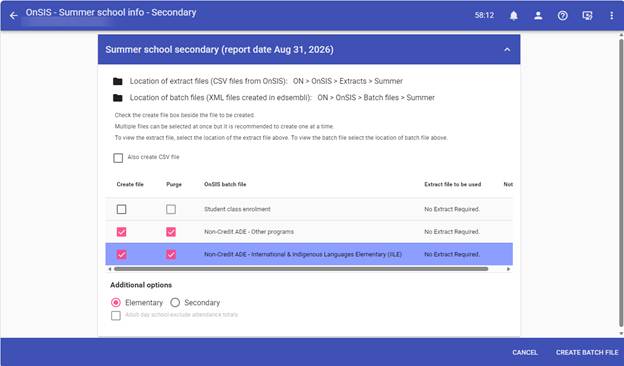
OnSIS – Summer School – Summer School info – Create
Select the boxes for Non-Credit ADE – other programs
Select the boxes for Non-Credit ADE – International & Indigenous Language Elementary (IILE)
Additional options select Elementary
Create this batch file.
Step 2
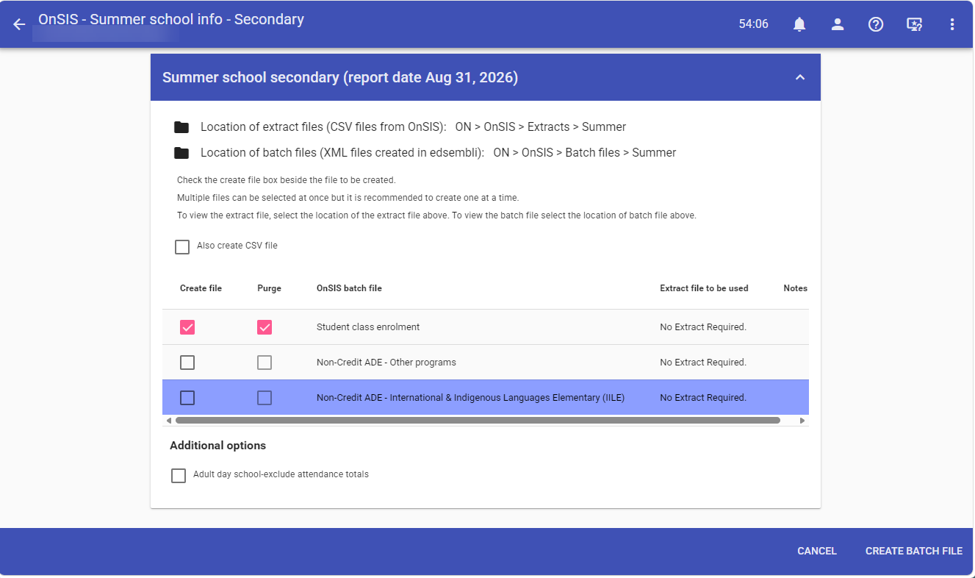
Select the boxes for Student class enrolment
Important under Additional options select Secondary
Uncheck the boxes for Non-Credit ADE – other programs
Uncheck the boxes for Non-Credit ADE – International & Indigenous Language Elementary
By doing this process in this order it will assure that you get the Secondary students along with the completed marks and credits.
Create this batch file.
Was this article helpful?
That’s Great!
Thank you for your feedback
Sorry! We couldn't be helpful
Thank you for your feedback
Feedback sent
We appreciate your effort and will try to fix the article