ISSUE: How to reset the timing of reminder emails for requisition approvals
Ticket | 147489 |
Error | N/A |
Causes | N/A |
Solution | See below |
Error Message:
Solution:
A ticket was logged asking how to change the daily emails that are sent to requisition approvers if they have approvals pending. Below are the steps to achieve this.
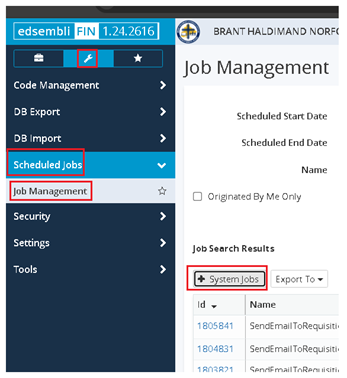
- Go to System Menu, Scheduled Jobs, Job Management and then click on + System Jobs
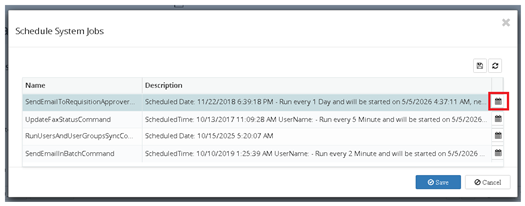
- Click on the calendar icon on the far right of the SendEmailToRequisitionApprover line
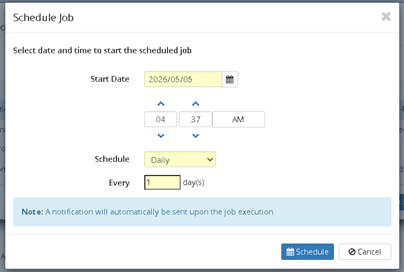
- Change the time as needed and click Schedule
Step 1
Step 2:
Step 3:
Please log a ticket with Edsembli FIN if you have any questions, comments or concerns with the above.
Was this article helpful?
That’s Great!
Thank you for your feedback
Sorry! We couldn't be helpful
Thank you for your feedback
Feedback sent
We appreciate your effort and will try to fix the article