Fixing Large Negative Amount when EID Starting in Middle of School Year
GOAL: To provide a wholistic overview of the Entitlement Earnings calculations and potential negative earnings implications of starting a position in the middle of the year, and how to make use of the PAYROLL > PAY PROCESS > SALARY PROJECTION & DISTRIBUTION module to override these large negatives for when an Employee starts in the middle of the year.
PROCESS OVERVIEW – Large Negative for First Pay in Middle of Year
STAFFING > POSITION & ASSIGNMENT > 11639
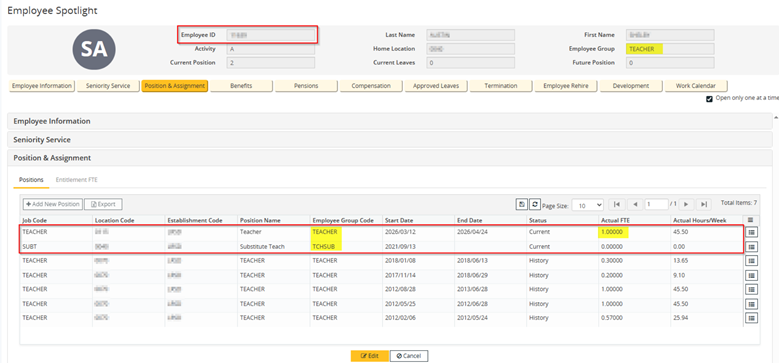
**2 Positions, Temp Teacher position, Primary Group = TEACHER**
COMPENSATION > 11639
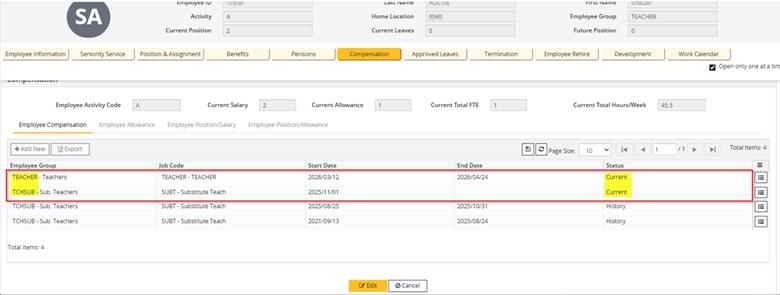
**Compensation matches Position setup**
Payroll > Employee > Basic Employee Data
**Nothing out of the ordinary**
Payroll > Employee > Non-Statutory Deduction
**Nothing out of the ordinary > No big Overrides**
Payroll > Employee > Statutory Deductions
**Nothing out of the ordinary > No big Overrides**
Payroll > Employee > DNP Entry
**No DNP under either Position**
PAYROLL > PAY PROCESS > YTD RECORD ADJUSTMENT > 11639 // TEACHER // 2025
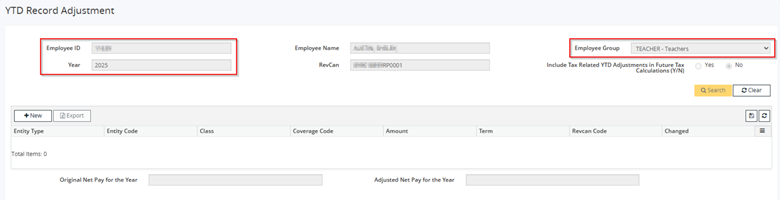
**No Current YTD records in TEACHER > First pay has not yet been completed**
PAYROLL > PAY PROCESS > YTD RECORD ADJUSTMENT > 11639 // TCHSUB // 2025
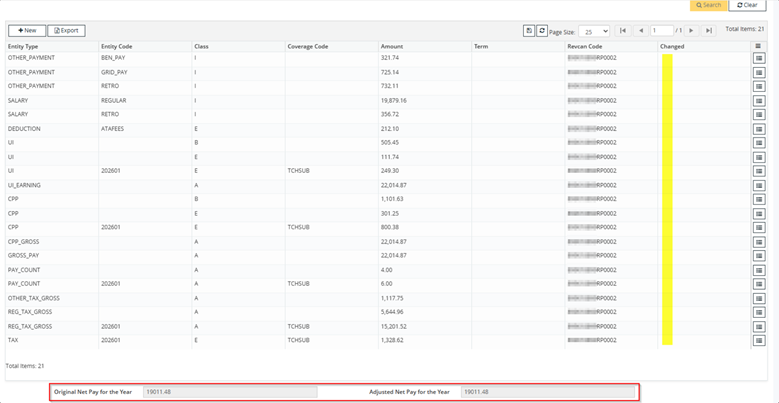
**YTD data generates, no adjustments noted**
PAYROLL > PAY PROCESS > ENTITLEMENT > TCHSUB + TEACHER
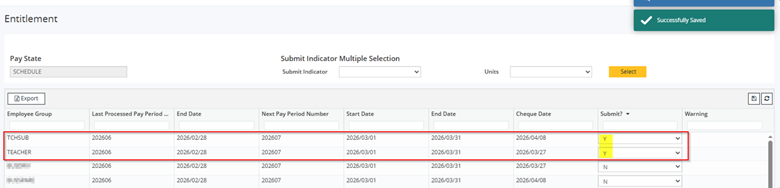
**Submit**
REPORTS > PROCESS REPORTS > Salary & Allowance Entitlement Adjustments

**No changes**
PAYROLL > PAY PROCESS > GROUP AUTHORIZATION > TCHSUB + TEACHER
**P > Submit**
PAYROLL > PAY PROCESS > SCHEDULE GROUPS > TCHSUB + TEACHER
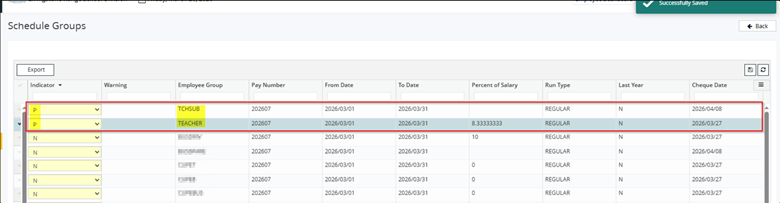
**Schedule TEACHER and TCHSUB secondary group**
PAYROLL > PAY PROCESS > PAY RUN
**Submit**
REPORTS > PROCESS REPORTS > PAY REGISTER > EID
TCHSUB
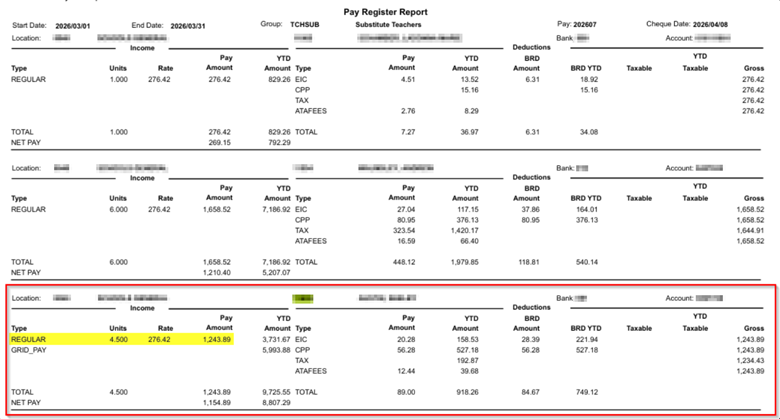
**Normal Pay Register for TCHSUB group**
TEACHER
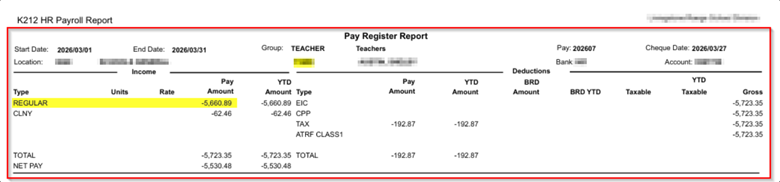
**Large negative for REGULAR earnings**
ABORT > SCHEDULE > TEACHER > PAY RUN DEBUG > EID > SUBMIT > PAY RUN DEBUG
-------------------------------------------Salary Start-------------------------------------------------------
CalculatePerPaySalary
posSal.AnnualSalary * ProcessingGroup.PayPeriodCalendar.PctAnnualSalForPeriod / 100, 2)99898,8.33333333
perPaySalary = 8324.83
Generate EMPLOYEE-PAY-RECORD for the PER-PAY-SALARY
-----------CalculateAnnualSalary---------
posSal.AnnualSalary = 99898
salAnnualSalary1 = 99898
salAnnualSalary2 = 0
-----------ProcessPayInput---------
ProcessPayInput epinSize = 2
payInput.EntityType = SALARY
payInput.EntityCode = REGULAR
payInput.PerPayAmount = -13985.72
WORK_DAYS = 14
Hours worked gathered from perPayWorkDays = 127.4
Hours worked gathered from pay input = 127.4
CONCLUSION
BACKGROUND: Above we can see a complete overview of the Employee ID in question, all of the Position, Compensation, Allowance, Employee level payroll setup, and more to see if there is anything obvious that would be causing the large negative on Pay Run.
ROOT CAUSE: Given nothing stands out when verifying all available configuration, and this is the first Pay Run for TEACHER for this EID, as they have joined quite late in the year, we can conclude that this is Entitlement calculating a large negative with Pay Period Ending Date (EOSY – End of School Year) of August 24th rather than the Employee Position End Date which is April 24th.
STEPS TO RESOLVE: This specific scenario is the exact intended use of the PAYROLL > PAY RUN > EMPLOYEE AUTHORIZATION > SALARY PROJECTION & REDISTRIBUTION module – to smooth out the large negatives in the case when Employees join significantly late in the year, for a short period of time and earnings become heavily impacted due to the nature of the inconsistency.
Salary Projection & Redistribution Module Notes
This facility is used to redistribute the percentage that an employee is paid which may differ from the percentage distribution of salary for that employee group. Payment method 1 employee groups are paid a percentage of their annual salary each pay (as defined in the pay period calendar). It may be necessary to override the percentage amounts defined in the pay period calendar for a particular employee (e.g. when the employee starts or ends in the middle of a pay period, etc.).
PROCESS OVERVIEW – Manual Correction of Large Negative
PAYROLL > PAY PROCESS > POST RUN > ABORT & ROLLBACK

**Rollback the Current Pay run**
Important Note: Users must trigger an Entitlement to be Authorized so that the Employee ID record will generate under Salary Projection and Redistribution module.
This can be achieved by processing a “dummy” change, such as changing FTE > Saving > Changing FTE back to original > Saving again.
STAFFING > EID > POSITION & ASSIGNMENT
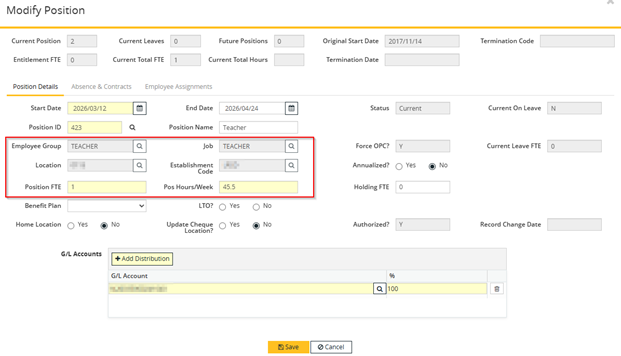
**Current setup**
Process Dummy Change > TAB > Save
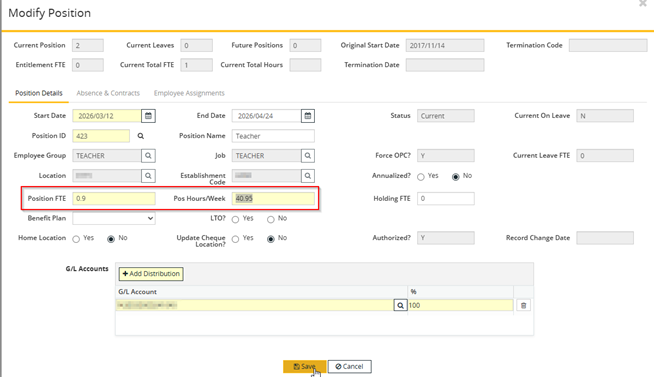
**Confirm the change successfully saved**

Undo the Change > Save
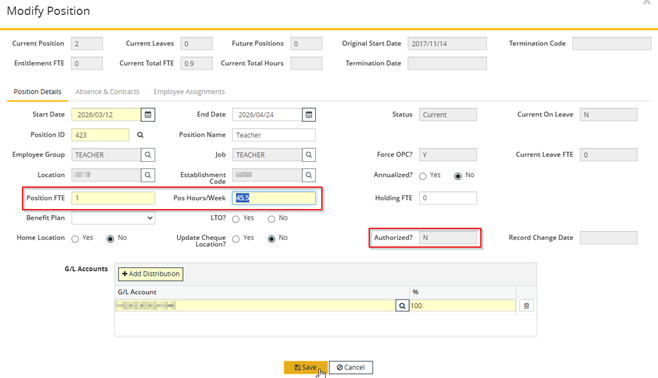
**Confirm the change successfully saved**

PAYROLL > PAY PROCESS > PAY RUN > ENTITLEMENT > EMP_GROUP
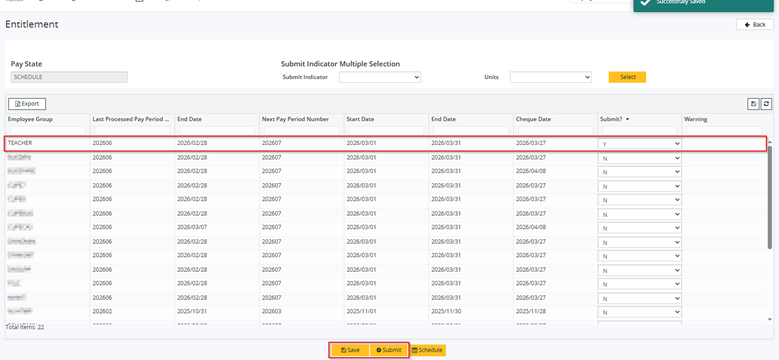
**Save >> Submit**
REPORTS > PROCESS REPORTS > Entitlement Report
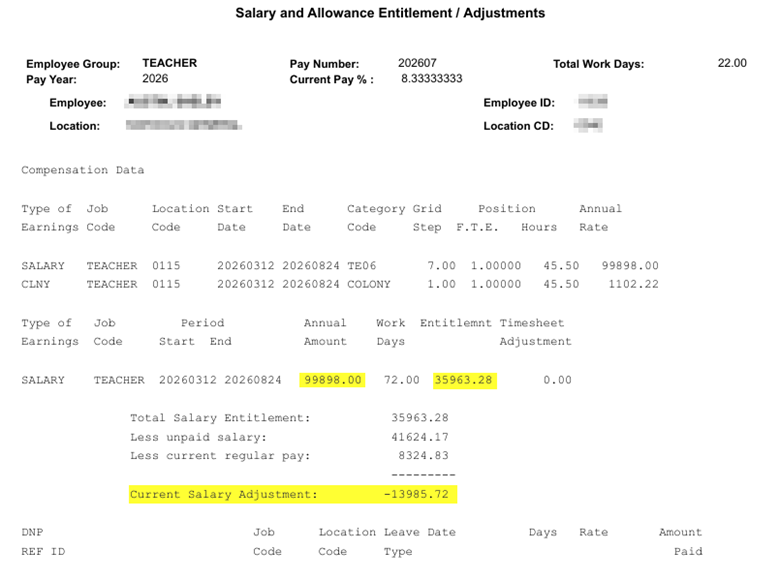
**Confirm it completed**
Note: Annual Amount = 99,898.00 and Entitlement = 35,963.28.
PAYROLL > PAY PROCESS > PAY RUN > GROUP AUHTORIZATION > EMP_GROUP

**Save >> Submit**
REPORTS > PROCESS REPORTS > Group Authorization Process
**Confirm it completed**
PAYROLL > PAY PROCESS > EMPLOYEE AUTHORIZATION > SALARY PROJECTION & REDISTRIBUTION > EID
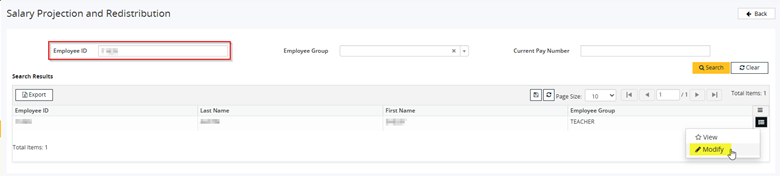
**Modify**
Modify the Pay Number Record in Question
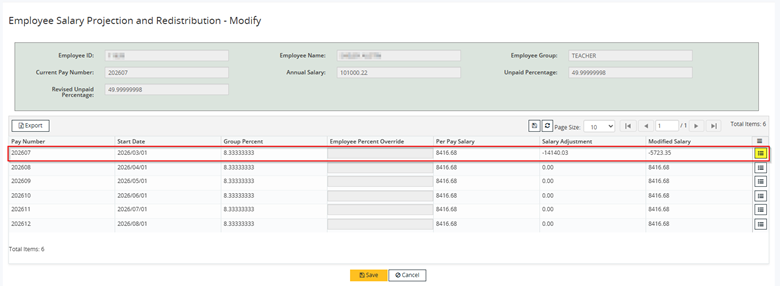
Play around with the ‘Employee Percent Override’ value and watch the ‘Modified Salary’ value as this reflects the output that will generate on Pay Run
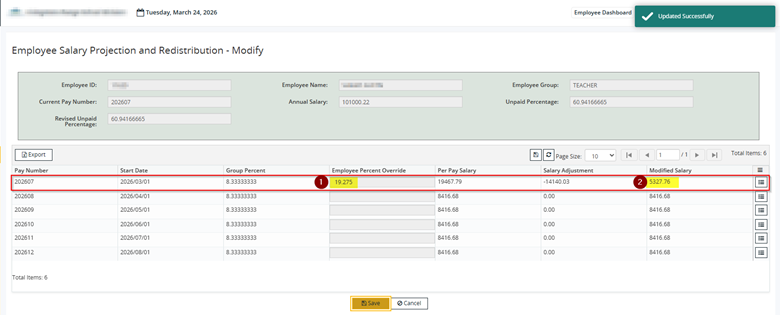
**Desired Pay is about 5,327**
------------------------------------------------------------------------------------------------------------------------------------------
Detailed Explanation of Employee Percent Override and Modified Salary Relationship
EQUATION BREAKDOWN: Very first PP Redistributed % is calculated as:
(desired Gross Salary this Pay - Entitlement Adjustment) / Annual pro-rated salary = Redistribution %
Note: In this case, Entitlement Adjustment is a negative adjustment, so you end up adding the 13k onto the desired Regular Pay Amount.
Note: Annual Pro Rated Salary in this case is 99,898.00 as shown from above Entitlement & Compensation.
EXAMPLE BREAKDOWN: There are 6 pays left, but there is only 35,963.26 entitled to be paid for the rest of the year.
8,324.83 per Pay Period * 6 Pays - Salary Adjustment = 13,985.72 = 35,963.26
If we wanted to break out 35,963.26 over 6 equal payments, that would be 5,993.88 per pay period, but there's a -13k entitlement adjustment.
Without a Negative Entitlement Adjustment, a regular Redistributed % to obtain a 5,993.88 pay is 5,993.88 / 99,898 annual salary = 0.06 or 6%.
However, the first pay period would be 6% of 99,898 (so 5,993.88) then apply the -13k adjustment, which you want to avoid doing because that would result in -7991.84
So what you can do is take 5,993.88 (desired redistributed pay amount) - -13,985.72 = 5,993.88 + 13,985.72 = 19,979.60
If we pay the EID 19,979.6, then minus the 13k reduction from the entitlement, we get to 5,993.88 in regular pay.
To cause the 19,979.60 pay, I need to take 19,979.60 / 99,898.00 Annual Salary = 0.20 so 20% of the annual salary.
SIMPLIFIED PROOF: If we take 20% of 99,898.00 = 19,979.60, then add the -13985.72 adjustment = Final pay of 5,993.88
------------------------------------------------------------------------------------------------------------------------------------------
PAYROLL > PAY PROCESS > SCHEDULE GROUPS > SUBMIT > PAY RUN (DEBUG)
**Submit**
REPORTS > PROCESS REPORTS > PAY REGISTER
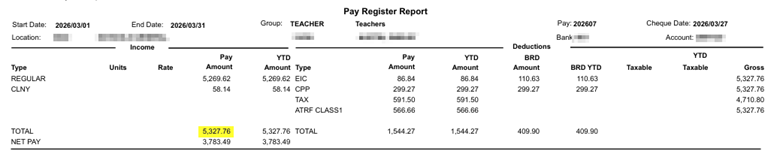
**Total Gross Pay = 5327.76 and matches the ‘Modified Salary’ value**
Was this article helpful?
That’s Great!
Thank you for your feedback
Sorry! We couldn't be helpful
Thank you for your feedback
Feedback sent
We appreciate your effort and will try to fix the article